If you want your website to show up on the very first page of Google, On Page SEO is one of the most essential things to learn. Even a well-designed website may struggle to rank if its pages are not properly optimized for search engines and users.
On Page SEO means improving individual web pages so they can perform better in search results. It includes writing useful content, using the right keywords, and optimizing headings, images, URLs, and page speed.
Whether you run a business website, an online store, or a blog, good On Page SEO helps search engines understand your content and gives visitors a better experience. In this guide, you will learn simple techniques that can improve rankings, bring in more organic traffic, and help you get more leads.
What Is On Page SEO?
On Page SEO is the process of improving the content and HTML elements of a webpage so it can rank better on search engines like Google. Unlike Off Page SEO, which focuses on backlinks and outside signals, On Page SEO is something you can fully control.
It helps search engines understand:
- What your page is about
- Which keywords it targets
- Whether the content is useful
- How easy the page is to use
A well-optimized page has a much better chance of ranking for relevant searches.
Why Is On Page SEO Important?
Google wants to show users the most helpful and relevant content. When your pages are optimized properly, it becomes easier for search engines to crawl, index, and rank them.
Benefits of On Page SEO include:
- Better Google rankings
- More organic traffic
- Improved user experience
- Lower bounce rate
- Higher conversion rates
- Stronger website authority
- Long-term visibility online
Best On Page SEO Techniques
1. Do Proper Keyword Research
Every good SEO strategy starts with keyword research. Choose one main keyword that matches what users are searching for, and add related keywords naturally throughout your content.
You can use tools like Google Keyword Planner, Ahrefs, or SEMrush to find useful keywords with good search volume.
2. Create High-Quality Content
Content is the base of SEO. Google prefers pages that offer helpful, accurate, and original information.
Your content should:
- Answer user questions
- Be easy to read
- Include examples
- Avoid duplicate content
- Be updated when needed
Try to make your content more useful than what already exists on competing pages.
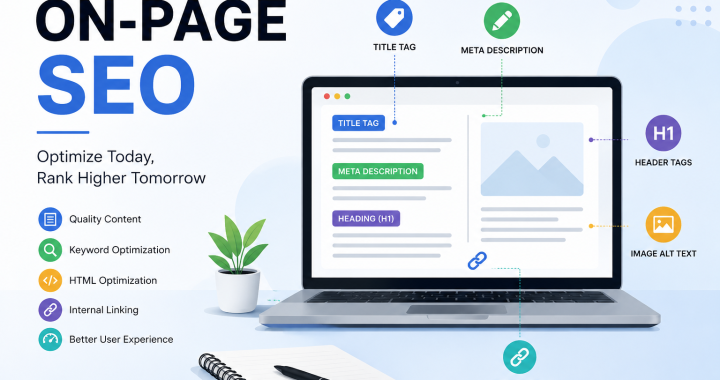
3. Optimize the Title Tag
Your title tag is one of the first things people see in search results.
Best practices:
- Keep it under 60 characters
- Include the main keyword
- Make it interesting enough to get clicks
Example:
On Page SEO: Simple Guide to Rank Higher on Google
4. Write a Good Meta Description
Meta descriptions do not directly affect rankings, but they can improve click-through rates.
A strong meta description should:
- Include the target keyword
- Be around 150–160 characters
- Clearly explain what the page is about
5. Use Heading Tags Correctly
Organize your content with H1, H2, and H3 headings.
This makes the page easier to read and helps search engines understand the structure of your content.
Use only one H1 tag and divide the rest of the content into clear subheadings.
6. Optimize URLs
SEO-friendly URLs should be short, clear, and include the keyword when possible.
Example:
Good:
yourwebsite.com/on-page-seo-guide
Avoid long URLs with extra numbers or unnecessary symbols.
7. Add Internal Links
Internal links connect related pages on your website.
Benefits include:
- Easier navigation
- Better crawling
- Better distribution of page authority
- More time spent on your website
For example, a blog about On Page SEO can link to pages about SEO services or content marketing.
8. Optimize Images
Large images can slow down your website.
To optimize images:
- Compress file sizes
- Use clear file names
- Add descriptive alt text
- Use modern image formats when possible
Optimized images improve both speed and accessibility.
9. Improve Page Speed
People expect websites to load quickly. Slow pages can increase bounce rates and hurt rankings.
You can improve speed by:
- Compressing images
- Removing unnecessary scripts
- Using browser caching
- Choosing reliable hosting
Fast websites give users a better experience and are preferred by search engines.
10. Make Your Website Mobile-Friendly
Most people browse on mobile phones. Google uses mobile-first indexing, which means it mainly checks the mobile version of your website.
Make sure that:
- Text is easy to read
- Buttons are easy to tap
- Pages adjust to different screen sizes
- Navigation is simple
11. Focus on User Experience
SEO is not only about keywords. A clean design, readable text, simple navigation, and clear calls to action help visitors stay longer and interact with your content.
Good user signals can support better long-term performance.
Common On Page SEO Mistakes
Avoid these mistakes if you want better rankings:
- Keyword stuffing
- Duplicate content
- Missing title tags
- Low-quality images
- Broken internal links
- Slow page speed
- Thin content
- Ignoring mobile users
- Missing alt text
- Poor heading structure
Regular SEO audits can help you find and fix these problems.
On Page SEO Checklist
Before publishing any page, make sure you have:
- Main keyword in the title
- SEO-friendly URL
- Optimized meta description
- One H1 heading
- Proper H2 and H3 headings
- Original and useful content
- Internal links
- Optimized images with alt text
- Mobile-friendly design
- Fast loading speed
Using this checklist regularly can improve your website’s performance.
Conclusion
On Page SEO is one of the best ways to improve your website’s visibility and attract organic traffic. By optimizing titles, headings, content, images, URLs, and page speed, you create pages that are useful for both users and search engines.
Remember that SEO is an ongoing process. Keep updating your content, track performance, and improve your strategy over time. Consistent optimization can lead to better rankings, more traffic, and stronger business results.
Frequently Asked Questions (FAQs)
1. What is On Page SEO?
On Page SEO is the process of optimizing individual web pages so they can rank better and become more visible in search engine results.
2. Why is On Page SEO important?
It helps search engines understand your content, improves user experience, and increases your chances of ranking higher on Google.
3. What is the difference between On Page SEO and Off Page SEO?
On Page SEO focuses on changes made inside your website, while Off Page SEO includes outside factors such as backlinks and brand mentions.
4. How often should I update my On Page SEO?
You should review and update important pages every few months or whenever search trends, user needs, or your business changes.
5. Does page speed affect SEO?
Yes. Faster websites usually give users a better experience and can help improve search rankings.
6. Are keywords still important for SEO?
Yes, but they should be used naturally. Focus on relevance and user intent instead of repeating the same keyword too often.
7. How many keywords should I target on one page?
It is best to focus on one main keyword and a few closely related secondary keywords that support the topic.
8. Can I do On Page SEO without technical knowledge?
Yes. Many On Page SEO tasks, such as improving content, headings, images, and internal links, can be done without advanced technical skills.